URL mapping tool for SEO migrations

URL mapping tool for SEO redirect maps.

Generate a complete URL map for your migration. Match old URLs to new destinations, review reasons and guard flags, then export the accepted 301 redirects.

URLMatcher automated URL mapping and redirect mapping dashboard
Review state
Guard checked
Review workspace
Reasons visible
redirects-mapping.xlsx
Manual mapping
Large URL set to review
Manual review grows quickly
Old URL
New URL
?
/old-shop/products/blue-widget-v2
???
/products/red-shoe-mens-size-10
/store/shoes/red
?
/nl/winkel/fietsen
???
/blog/2023/seo-tips
/insights/seo-tips
/promo/black-friday-deal
???
/old-shop/products/blue-widget-v1
/products/widget
?
The problem

Why manual URL mapping breaks at scale

Building a redirect map by hand takes days and is highly error-prone.

Missed redirects cause 404s, lost rankings and broken user journeys.

Spreadsheets cannot explain why two URLs match - making redirect QA painful.

URL mapping explained

What is URL mapping in SEO?

URL mapping in SEO is the process of connecting every important old URL to the best matching new destination before a migration goes live. The result is a reviewed URL map that keeps legacy entry points connected to relevant pages.

A URL mapping tool or URL mapping generator speeds up that work by comparing old and new crawl exports, suggesting matches and showing why each URL pair was selected.

URL matching is the comparison step, URL mapping is the reviewed old-to-new dataset, and redirect mapping turns that dataset into the 301 rules used during a website migration.

This is not a URL shortener or a basic redirect checker. It is a purpose-built URL mapper and URL redirect mapper for planning, reviewing and exporting redirects before a migration goes live.

01

URL matching

The engine compares every old URL with the new crawl and identifies the most relevant destination using exact, pattern and fuzzy signals.

02

URL mapping

The approved old-to-new pairs form a complete URL map, including confidence scores, review states and migration QA notes.

03

Redirect mapping

The accepted redirect map can be exported as CSV or JSON, or sent to Google Drive with its match details.

How it works

How the URL mapping generator builds your redirect map

01

Add both URL sets

Upload CSV, TSV, Excel or JSON, crawl the sites, or reuse a project.

02

Run the pipeline

Fixed matching stages process only the URLs that earlier stages leave open.

03

Review and approve

Filter by type, score, status and guard flags, then use row or bulk actions.

04

Export accepted matches

Download CSV or JSON, or send the reviewed result to Google Drive.

Capabilities

URL mapping features for SEO migrations

See how URLs are matched, held for review and exported for implementation.

Matching stages

Exact, path, title, structural and content checks run in a fixed order before unresolved URLs reach review.

Matching stagesIllustrative flow
Exact
Path
Title
Content
Review

Each stage only receives URLs that earlier stages did not resolve.

Safety guards

Intent, page type, locale, many-to-one and near-duplicate checks hold risky matches for review or block them.

Guard decisionsIllustrative flow
Intent mismatch
Blocked
Page type mismatch
Review
Locale mismatch
Blocked
Near-duplicate targets
Review

Confidence and reasons

Review the proposed destination together with its status, match type and the reasons behind the suggestion.

Match explanationIllustrative flow
Old/shop/trail-shoeNew/shoes/trail-running
ReviewSlug overlapSame page type

The decision stays tied to the source URL, target URL and match reasons.

Path, domain and locale changes

Approve domain moves, language-prefix changes and repeated path renames before they affect the full mapping.

Approved URL changesIllustrative flow
old.com/shop/
new.com/store/
Path
old.com/nl/
new.com/nl-nl/
Locale
old.com/product/
new.com/products/
Pattern

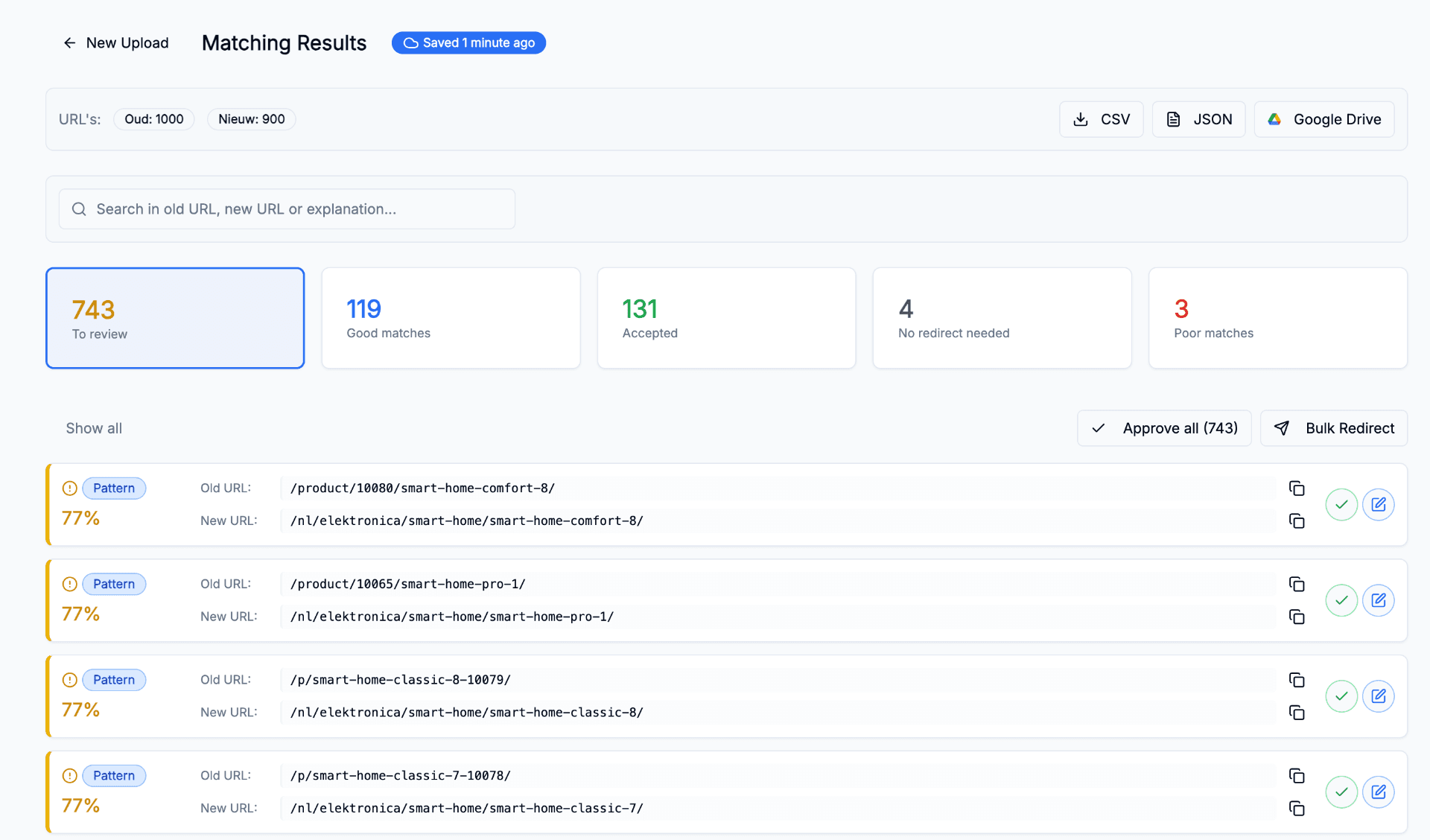
Review workspace

Work through pending matches by type, inspect old and new URLs together and accept or edit each destination.

Sample data
Review workspace in URLMatcher using sample data

Save and export

Resume saved sessions and export accepted redirects to CSV, JSON or Google Drive for implementation.

Sample data
Save and export in URLMatcher using sample data
Use cases

URL redirect mapping for every migration type

01

Replatforming

Move from one CMS to another while keeping old paths and their proposed new destinations in a reviewable file.

Product, category and content URLs often follow different rules. Match them in one workspace without treating every page type as interchangeable.

Magento → Shopify - category & product flows
WordPress → Headless - slug normalization
Custom CMS migrations - any source format
Review states - accepted, review or blocked
02

Domain consolidation

Merging multiple domains or subdomains into one canonical structure with safe locale-aware redirects.

Multi-brand mergers and international consolidations need locale guards - match nl/de/en separately, not as one pile.

Multi-brand merge - preserve link equity
Subdomain to folder - blog., shop. → /
International consolidation - per-locale matching
Locale guard - no cross-language mixups
03

Site restructure

Reorganize URL hierarchy, rename categories or normalize slugs while keeping the old-to-new decisions visible.

Even small slug changes accumulate fast. Pattern recognition picks up entire family rewrites in one pass.

Category renames - family-level mapping
Depth changes - /a/b/c → /a/c flattening
Slug normalization - casing, dashes, accents
Pattern detection - auto-learn rewrites
FAQ

Questions, answered.

Build your redirect map with review built in

Upload your old and new URL lists, review the suggested matches and export a deploy-ready 301 redirect map.

No credit card required