
URL Mapping Tool
The URL mapping tool for redirect maps you can trust.
Build a 301 redirect map for your SEO migration. Match old URLs to relevant new pages using URL signals and optional meta titles, then review and export your approved matches.
Start with two URL lists. One matching credit per processed old URL. View credits and pricing
Why use a redirect mapping tool?
A spreadsheet stores your redirect map. URLMatcher helps you find the destinations: compare URL patterns and available meta titles, even when the new paths look different.
Review suggestions by match category, adjust destinations and save your decisions in one workspace. Export only the pairs you approve, ready for your team to implement.

URL mapping explained
What is URL mapping in SEO?
URL mapping connects old URLs to relevant new destinations. For a website migration, this redirect mapping becomes the plan for your 301 redirects: which old page should redirect to which new page.
Start with two URL lists
Upload old and new URLs, crawl either site or reuse a project crawl. You can start with URLs alone.
Include page titles when available
Titles from your crawl or import add evidence when paths have changed substantially. A URL-only file provides no title information.
Keep mapping and implementation connected
Build and review your old-to-new pairs, then export the accepted redirects for your website or server.

How matching works
How URLMatcher finds matching pages
The matcher compares old and new URLs in stages, starting with direct matches and using further signals for the URLs that remain. Paths, meaningful words and available page titles help identify relevant destinations.
Compare paths and distinctive words
Normalized paths and slugs identify direct matches. For changed URLs, specific product names, model numbers and slug terms provide stronger clues than generic folders such as /products/.
Recognize changes across a site
Repeated path changes, such as /shop/ becoming /store/, provide clues for groups of URLs. Domain and language context also inform matching.
Use titles to bridge different paths
When page titles are supplied on both sides, they provide an additional signal even if the old and new URLs share few words.
Separate replacements from fallbacks
A parent page or homepage may be proposed when a direct replacement is missing. Check its relevance before accepting a broader destination.

Human review
Keep control of the difficult matches
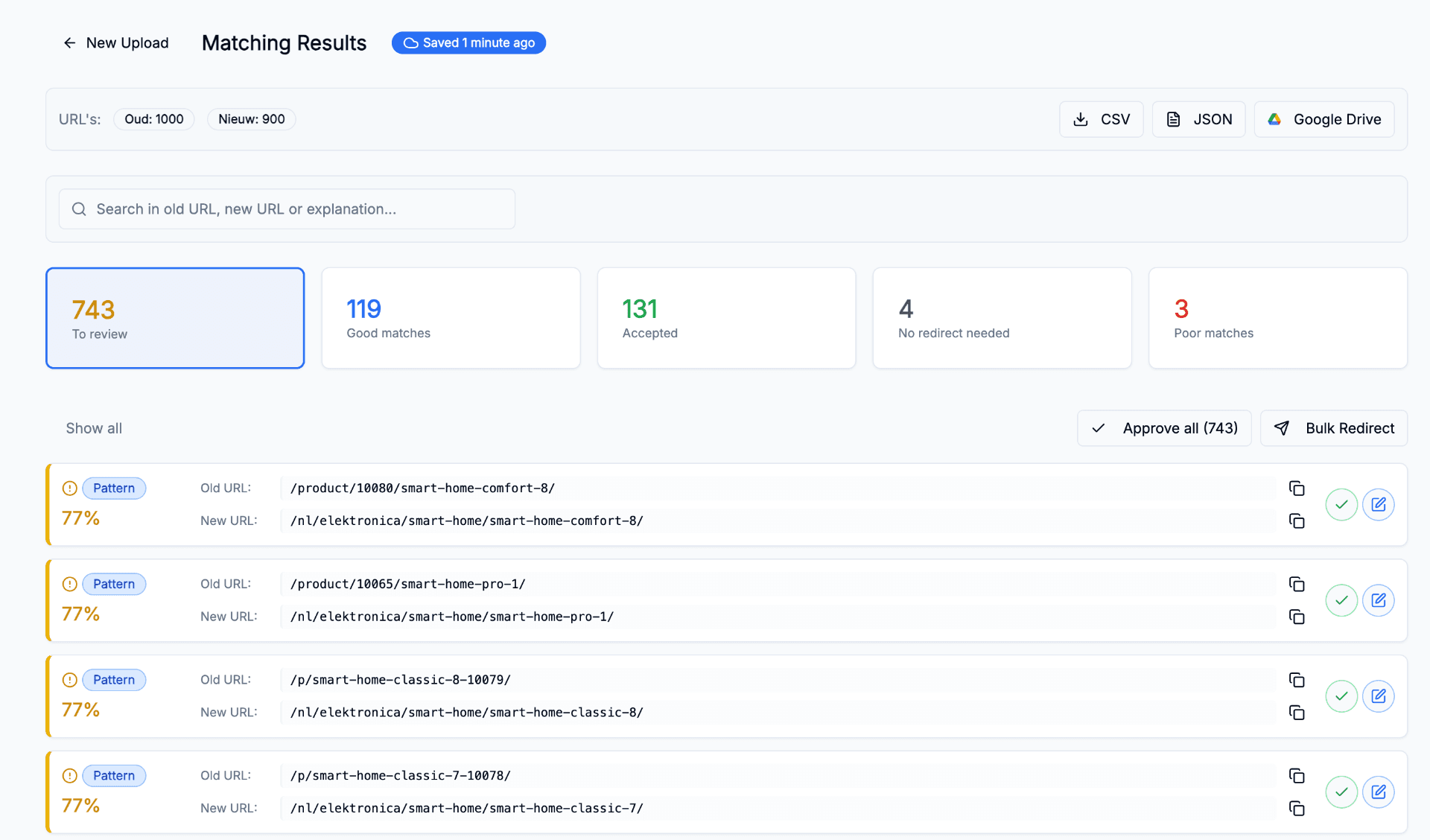
See the old and proposed new URL together, with a score and a match pill. Check the destination, then accept the suggestion or change it before export.
Read the score and match pill
The score and pill identify the match alongside the two URLs. Use them to decide which pairs to review first.
Work through groups efficiently
Filter by match category, use bulk approval for the group you are reviewing and edit individual destinations where needed.
Keep the final decision
Accept, edit, reject or leave a suggestion pending. Resume your saved session later. Only accepted matches enter the redirect export.
Inside the product
Review and export your 301 redirect map
The results workspace brings the URL pairs, scores, match pills and approval controls together. Export accepted pairs for your team or developer to implement.
A clear row for each source URL
CSV exports contain Old URL, New URL, Type, Score and Status. JSON exports include from, to, type and score for each redirect.
Use the output in your workflow
Download CSV or JSON, or export CSV to Google Drive. Adapt the map to the format your CMS or server requires.
Continue into migration checks
Use the redirect map in the SEO Migration Tool to check implementation and follow the move after launch.
Where it helps
Use the URL mapping tool for different site moves
Plan your redirect mapping before a website migration or relaunch changes your URLs. Match moved pages to their replacements and connect consolidated content to the relevant new destination.
CMS and platform moves
Keep product, category and content pages connected when a rebuilt site changes their paths.
Domain and content consolidation
Bring domains into one site or connect several old articles to a relevant combined guide. Review each source URL against its intended destination.
Site restructures
Handle category renames and path changes across families of URLs.
FAQ
Frequently asked questions
Which files can I import and export?
Import CSV, TSV, Excel or JSON, crawl either site directly, or reuse an SEO Project. Export accepted matches as CSV or JSON, or send them to Google Drive.
Can I start with URLs alone?
Yes. Two URL lists are enough to start comparing paths, slugs and URL words. Include page titles on both sides when available, especially if the new paths look very different.
Does the matcher compare full page content?
The standard URL mapping workflow uses URL information and optional page titles. The matching step does not fetch every page to perform a full-page content comparison. Crawl the sites or import their titles beforehand to provide that additional evidence.
What does a confidence score mean?
It indicates the strength of the matching signals for a proposed pair. It is not a calibrated accuracy percentage. Compare the score and match pill with the old and new URL, particularly for fallback suggestions or pages with similar names.
What happens if there is no direct replacement?
The matcher can suggest a parent page or a homepage fallback. A broad fallback does not establish that the pages are equivalent. Review the target, verify it exists and reject or edit it if it does not serve the old page's purpose. Pending and rejected suggestions stay out of the redirect export.
How many credits does my migration need?
One processed old URL uses one matching credit. A run with 8,000 old URLs and 12,000 new URLs needs 8,000 matching credits. The new URL list does not add matching credits. Credits depend on the old URLs processed, including those without a suitable replacement.
Do reviewing and reopening a session cost matching credits?
Reopening saved results, reviewing suggestions and editing destinations do not start a new matching run. Starting a fresh matching run processes the selected old URLs again and uses credits for that work. Resuming an existing server run is different from starting a new one.
Are crawl limits and matching credits the same?
No. Matching credits cover processed old URLs. Project page limits and crawl frequency are separate plan allowances. You can import existing URL inventories instead of using a project crawl as the source. Check the pricing page for included credits, credit-pack prices and project limits before a larger migration.
Can I map multilingual URLs?
Yes. Matching takes language context into account. Review the old and new language versions together, especially when prefixes change or a site combines several markets.
Does URLMatcher put the redirects live?
No. URLMatcher exports the accepted redirect map. Your team or developer implements it in the CMS, website or server and checks that the redirects reach the intended pages.
How can I evaluate matching quality for my website?
Start with a representative selection of your own URLs, including renamed pages, similar products and removed content. Check the proposed destinations and note where you would change a suggestion before working through the full migration.
Build your SEO redirect map with URLMatcher
Upload your old and new URL lists, add meta titles when available and review the suggested destinations before exporting your redirect map.